So today I was playing around with a way to get the mapping seamlessly into 3D without having to load up Google Earth. I came up with a solution by integrating Microsofts Virtual Earth into the viewer. Basically there is a link in the tackle box next to the map that says "3D Virtual Earth (Beta)". If you click this link it will load up the map in Virtual Earth. While in this view, you can zoom into an area by using the scroll bar in the upper left hand corner or by using your mousewheel (if you have one). When you zoom into certain areas (such as New Haven) a link in the left hand navigation will appear where you can see a "Birds Eye View". This view shows high resolution Aerial Imagery taken at an angle which gives a 3D perspective. The basic idea behind this is while planes fly overhead to take the typical aerial imagery that you are used to seeing on mapping sites like this one and Google Earth, it also takes photographs at a 45 degree angle from the front, back and sides of the aircraft. This technology gives you the 3D type imagery. Note: only certain areas of the state have this birds eye view. Mostly along the shoreline. More imagery will become available in the coming months, so check back often.
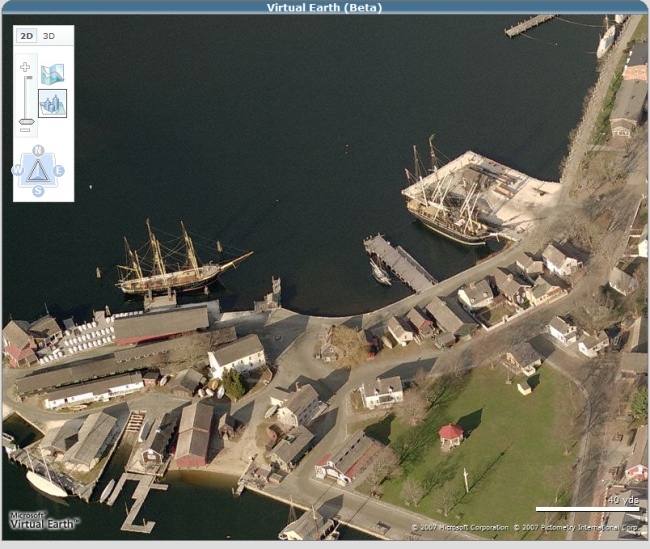
Here is a screenshow of the Birds Eye View on Mystic Seaport. As you can see there is a navigation bar where you can view the seaport from different angles, zoom in, zoom out, and return back to 2D map view.
Also, there is a button in the left hand navigation called "3D". If you click this button it will load the map in 3D. The first time you load it, a prompt will come up for you to download the 3D pluggin. You only need to download and install this pluggin one time. Note: you need to have Windows XP Service Pack 2 to view this functionality. Once you download and run the program, the map will show up in 3D. There are various controls to tilt the viewer, zoom in, return to 2d, etc. I will continue to improve this functionality so that the viewer becomes more user friendly and interesting to use. Let me know if you have any questions/problems with it?
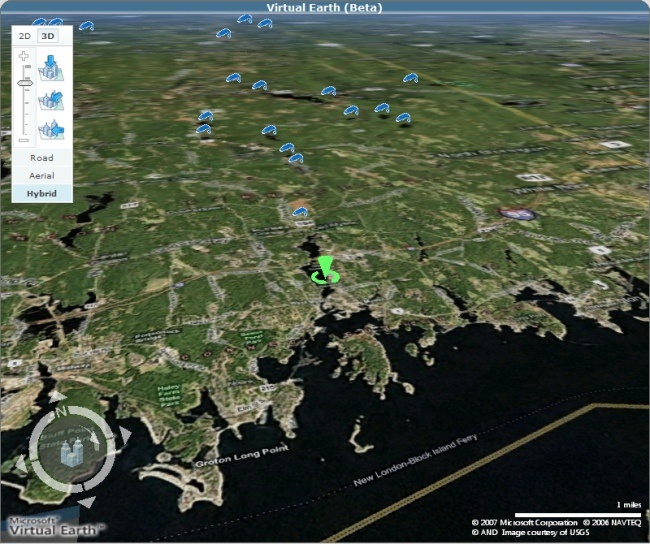
Below is a screenshot of the 3D view of Mystic Seaport area. The navigation control has buttons to view at different angles and rotate the map. You can also just hold CTRL and drag the mouse to angle the map. Remember you need to install the plugin before this functionality works.
Thanks,
Dave O
Here is a screenshow of the Birds Eye View on Mystic Seaport. As you can see there is a navigation bar where you can view the seaport from different angles, zoom in, zoom out, and return back to 2D map view.
Also, there is a button in the left hand navigation called "3D". If you click this button it will load the map in 3D. The first time you load it, a prompt will come up for you to download the 3D pluggin. You only need to download and install this pluggin one time. Note: you need to have Windows XP Service Pack 2 to view this functionality. Once you download and run the program, the map will show up in 3D. There are various controls to tilt the viewer, zoom in, return to 2d, etc. I will continue to improve this functionality so that the viewer becomes more user friendly and interesting to use. Let me know if you have any questions/problems with it?
Below is a screenshot of the 3D view of Mystic Seaport area. The navigation control has buttons to view at different angles and rotate the map. You can also just hold CTRL and drag the mouse to angle the map. Remember you need to install the plugin before this functionality works.
Thanks,
Dave O